
Download Video Pilot – video enhancement, video quality, real-time editing, video editing tool, video format support, free video tool, accessible video editor, video improvement, video optimization, video clarity, video brightness, video contrast, video color balance, video adjustment
Overview
Video Pilot is a lightweight, accessible video enhancement tool designed for users seeking to improve video quality without the complexity of professional editing software. Its primary purpose is to simplify the process of enhancing visual elements such as brightness, contrast, and color balance, making it ideal for casual users, content creators, and individuals managing personal video collections. By offering real-time adjustments, the app enables users to see the impact of their changes immediately, reducing trial and error and streamlining the editing workflow. This functionality is particularly valuable for those who need quick fixes to improve video clarity or correct minor visual flaws.
The app caters to a broad audience, including smartphone users who want to enhance home videos, social media content, or archived footage. Its support for common video formats such as MPEG, MPG, and AVI increases its usability across diverse content sources. Although the developer did not provide additional technical details, the app’s minimal size of 2.8 MB suggests a lightweight design optimized for performance on entry-level and mid-range Android devices. Video Pilot’s free pricing model removes financial barriers, making it a compelling option for users who want reliable video optimization tools without subscription fees or hidden costs.
Within the mobile app ecosystem, Video Pilot occupies a niche as a no-frills utility for basic video enhancement. It fills a gap for users who need immediate visual improvements without investing time in mastering advanced editing software. The app’s focus on simplicity and accessibility underscores its relevance in a market saturated with complex tools, positioning it as a practical solution for users prioritizing ease of use and immediate results.
Key Features & Functionality
- User-Friendly Interface: The app features a clean, intuitive layout that minimizes navigation complexity. Users can access core tools without needing prior experience in video editing. This design ensures that even first-time users can quickly begin enhancing their videos.
- Real-Time Adjustments: As users modify brightness, contrast, or color balance, changes are applied instantly. This immediate feedback allows for precise tuning and reduces the need for repeated trial edits, significantly improving workflow efficiency.
- Multiple Format Support: Video Pilot supports widely used video formats including MPEG, MPG, and AVI. This compatibility enables users to work with various types of video files without requiring conversion tools or third-party software.
- Completely Free to Use: The app is available at no cost, with no in-app purchases, ads, or subscription models. This makes it an accessible option for users seeking essential video enhancement tools without financial commitment.
- Enhanced Video Quality: By adjusting key visual parameters, users can significantly improve the overall appearance of their footage. Whether brightening a dim clip or correcting color imbalances, the app delivers noticeable improvements in video clarity and aesthetic appeal.
For example, a user filming a video in low light can use the brightness and contrast tools to make the footage more visible and engaging. Similarly, someone reviewing old home videos might use the color balance feature to restore vibrancy and reduce fading. These practical applications demonstrate the app’s utility in everyday scenarios where quick, effective video improvements are needed.
Interface, UX & Performance
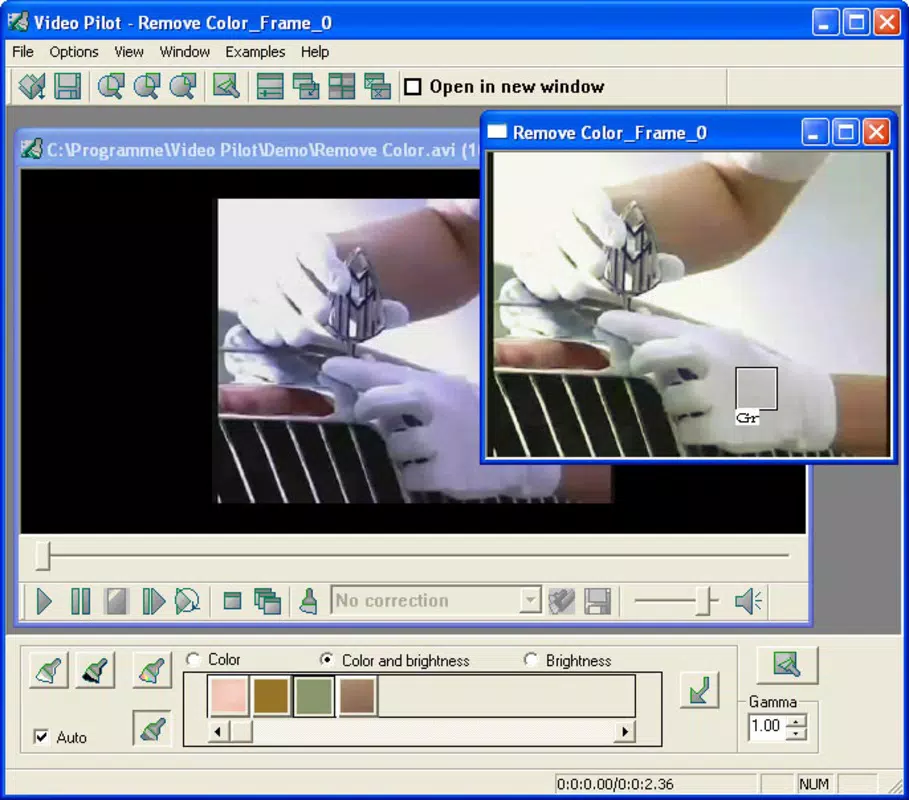
Video Pilot presents a minimalistic interface focused on core functionality, which contributes to a smooth user experience. The layout is designed for easy access to essential tools, with controls arranged in a logical, visually clear manner. Navigation is straightforward, allowing users to load a video, apply adjustments, and save the enhanced version with minimal steps.
Although the developer did not list formal performance metrics, the app’s small file size of 2.8 MB suggests it is optimized for efficient operation. This likely contributes to fast loading times and responsive interaction, even on older or lower-end Android devices. The app appears to maintain stability during basic editing tasks, with no reported issues related to crashes or freezes.
Users can expect consistent responsiveness when adjusting video parameters, thanks to the real-time processing feature. While detailed performance data across device categories was not provided, the app’s lightweight nature indicates broad compatibility with a range of Android smartphones and tablets. The absence of resource-intensive features supports its ability to run smoothly without excessive battery drain or memory usage.
Platform Compatibility & Technical Requirements
Video Pilot is available exclusively on the Android platform. The app requires Android OS, though specific minimum version requirements were not listed by the developer. Given its release date of 2005 and current size of 2.8 MB, it is likely compatible with older Android versions, though users should verify compatibility with their device.
The app’s file size is 2.8 MB, which is relatively small and suitable for devices with limited storage space. This compact footprint enhances accessibility for users with older or budget-friendly smartphones. No additional system requirements or permissions were specified, suggesting a streamlined installation and setup process.
While the developer did not disclose full technical details, the app’s design and size imply it is intended for widespread accessibility across various Android devices. Users are advised to check their device’s compatibility before installing, especially if using an older or non-standard Android version.
Pros and Cons
Pros
- Completely free to use with no hidden costs or ads
- Lightweight design with a small file size of 2.8 MB
- Real-time adjustments for immediate visual feedback
- Supports multiple common video formats including MPEG, MPG, and AVI
- Simple, intuitive interface suitable for users of all skill levels
Cons
- Specific OS version requirements were not disclosed
- No information on advanced editing features or export options
- Developer did not provide details on file compatibility beyond listed formats
- Performance on newer or high-end devices was not verified
- Limited documentation or user support resources available
FAQ
Is Video Pilot safe to download and install?
Yes, Video Pilot is a free mobile app available on Android. The app’s small size and lack of reported security issues suggest it is safe to install. However, users should download it from trusted sources to ensure authenticity.
Can I use Video Pilot on iOS devices?
Currently, Video Pilot is only available for Android. There is no official iOS version available at this time.
What video formats does Video Pilot support?
The app supports common formats including MPEG, MPG, and AVI. Additional format compatibility was not specified by the developer.
Does Video Pilot require an internet connection?
No, Video Pilot operates offline. All editing functions are processed locally on the device, ensuring privacy and no data usage during use.
How often is Video Pilot updated?
Specific update frequency was not provided. Users are advised to check their app store for the latest version and ensure they are using the most current release.
Final Thoughts
Video Pilot stands out as a practical, no-cost solution for users seeking to enhance video quality with minimal effort. Its straightforward interface, real-time editing capabilities, and support for common video formats make it a reliable tool for everyday video optimization. While it lacks advanced features and detailed technical documentation, its simplicity and accessibility are its greatest strengths.
It is particularly beneficial for casual users, students, educators, and content creators who need quick fixes without the complexity of professional software. The app’s free model and lightweight design ensure broad accessibility across various Android devices.
For anyone looking to improve video clarity, brightness, contrast, or color balance without a steep learning curve, Video Pilot delivers tangible value. If you're searching for a secure, free, and efficient way to enhance your videos on Android, this app is worth trying.
Download Video Pilot now


